Every new technology starts with a little curiosity. You connect it. You try a few things. It works. You get excited. Then one day, you ask it to do something slightly ambitious.
And it says:
“Max of 20 records can be fetched.”
That was my moment with the Dataverse MCP Server.
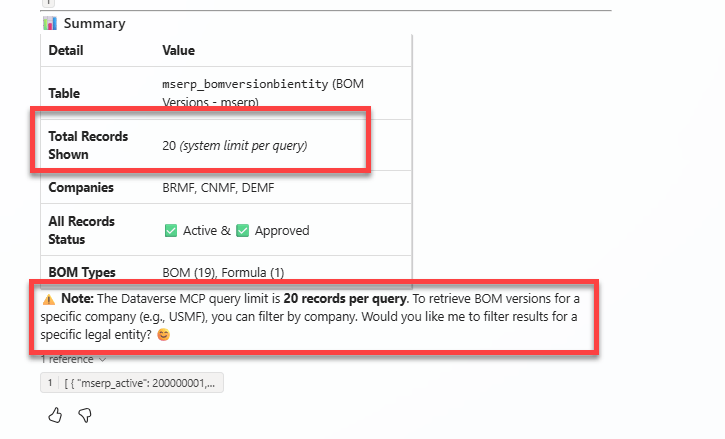
What started as a simple experiment quickly turned into a small technical adventure involving Copilot Studio, Dataverse SQL, Custom APIs, Dynamics 365 Finance & Operations virtual tables, and one very stubborn number:
20.
So this is not just a post about a limit.
It is really about understanding what the Dataverse MCP Server is designed for, what McpExecuteSqlQuery can actually do, and where the boundaries start to appear.
The Dataverse MCP Server is interesting because it gives AI agents a structured way to interact with Dataverse. A user can ask something simple like:
“Show me the latest customers.”
or:
“Which bank accounts are configured for USMF?”
The agent can translate that request into a query, retrieve the relevant data, and use the result as context for the answer.
At a high level, the flow looks simple:
User ↓AI Agent ↓MCP Server ↓Dataverse ↓Business Data
For native Dataverse tables, that is reasonably straightforward.
But when Dynamics 365 Finance & Operations virtual tables enter the picture, there is another layer involved.
AI Agent ↓MCP ↓McpExecuteSqlQuery ↓Dataverse ↓mserp_ Virtual Table ↓Virtual Table Provider ↓Dynamics 365 F&O
That additional layer becomes important because the query is no longer dealing only with Dataverse. It also depends on how the F&O virtual table provider behaves.
The real investigation started when I tried to retrieve a larger number of records.
I ran a query similar to this:
SELECT TOP 5000 mserp_bankaccounttablebientityidFROM mserp_bankaccounttablebientity
I was curious to see what would happen.
The result was very clear:
System.InvalidOperationException:Max of 20 records can be fetched.
Not 100.
Not 500.
Exactly 20.
That immediately raised the obvious question: where is this limit coming from?
The stack trace gave away an important clue. It pointed to:
McpExecuteSqlQueryOperation.AddOrEditTopClause()
That suggests the query is not simply passed through untouched. The MCP execution layer is inspecting the TOP clause and applying its own rules.
Looking at the Dataverse Custom API metadata revealed another useful detail. McpExecuteSqlQuery exposes a top parameter with a default of 20, and in the implementation I tested, 20 was also being enforced as the maximum result size.
So something like this fits the intended pattern:
SELECT TOP 20 nameFROM account
But this does not turn MCP into a bulk retrieval endpoint:
SELECT TOP 5000 nameFROM account
At first, it is easy to look at this and conclude:
“MCP can only work with 20 records.”
But that is not quite right.
The Copilot Studio description of the tool shows that Dataverse MCP SQL supports more than just basic lookups.
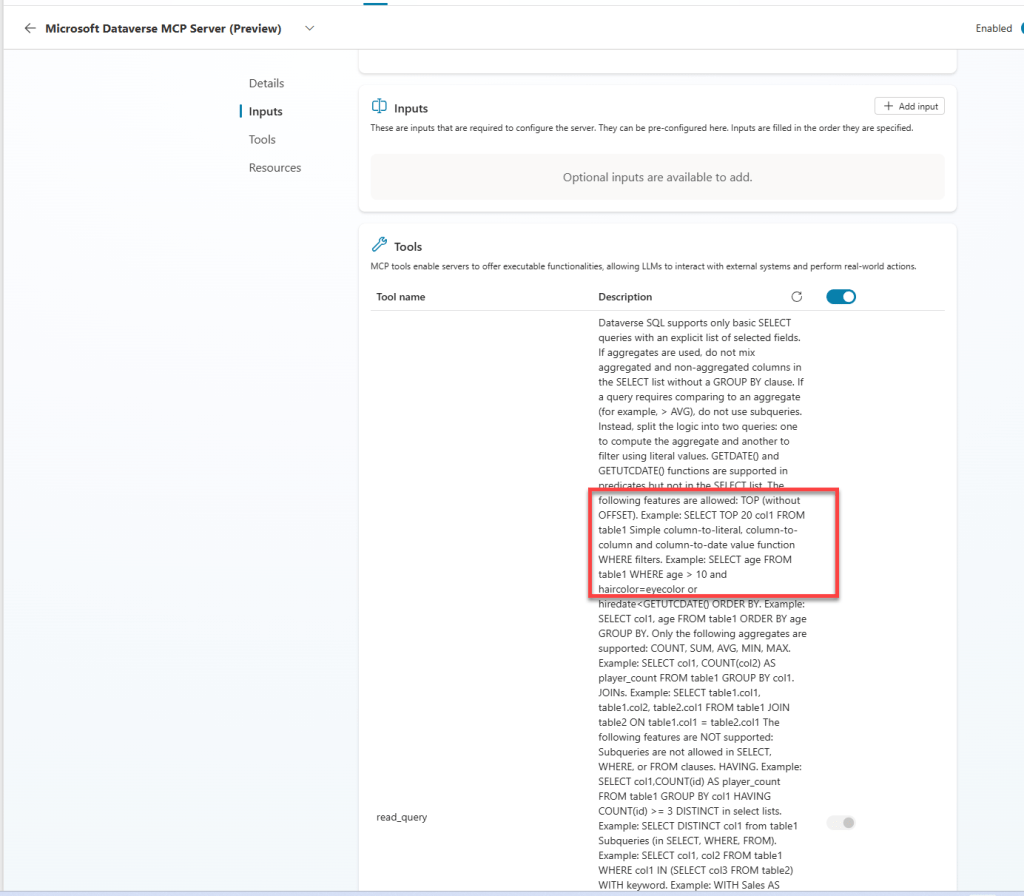
It supports:
SELECTTOPWHEREORDER BYGROUP BYJOINCOUNTSUMAVGMINMAX
So MCP can do more than retrieve a small set of rows.
For example:
SELECT TOP 10 name, revenueFROM accountORDER BY revenue DESC
is a perfectly reasonable query.
But so is:
SELECT statuscode, COUNT(accountid) AS account_countFROM accountGROUP BY statuscode
That distinction matters because the 20-record ceiling is better understood as a result-set limit, not necessarily a limit on how many records can be evaluated by the query.
MCP is not necessarily limited to looking at 20 underlying records. It is limited in how much row-level result data it wants to return to the AI agent.
That is a very different thing.There is another important boundary though: MCP SQL is not full SQL.
The tool description supports useful constructs, but deliberately excludes things like:
SubqueriesHAVINGDISTINCTOFFSETUNIONWITH / CTEsCASTCONVERTCASEDATEDIFFDATEADD
This gives a strong hint about the intended design. Microsoft is not trying to turn MCP into SQL Server Management Studio for AI agents.
Things get even more interesting when F&O virtual tables are involved.A native Dataverse table physically stores its data in Dataverse.An mserp_ virtual table does not.
So even if MCP SQL says:
“Yes, GROUP BY is supported.”
there is still another question:
“Can the underlying F&O virtual table provider execute this operation correctly?”
Those are two different capability checks.
This is why architects should be careful about assuming that a query that works against a native Dataverse table will behave exactly the same against an F&O virtual table.
During my testing, some aggregate scenarios against F&O virtual entities did not behave the same way as expected from native Dataverse tables.
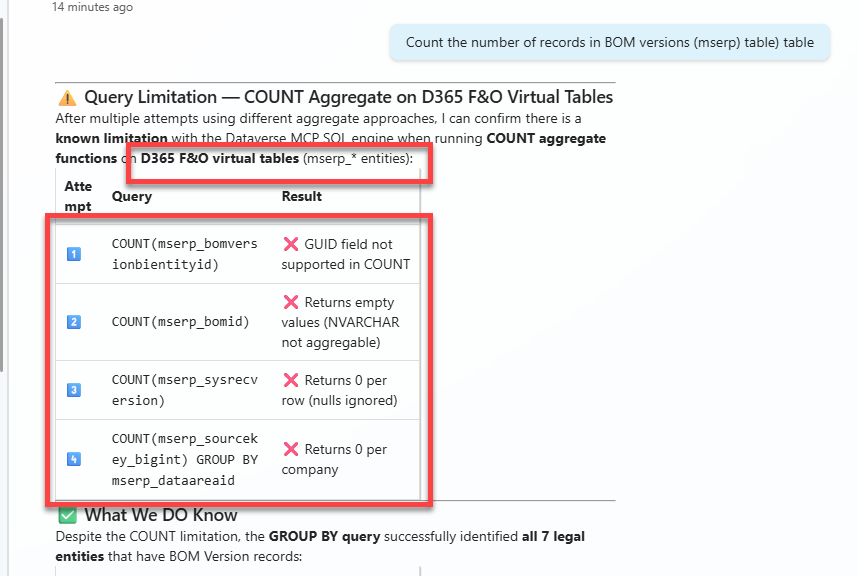
So the full picture is really something like this:
Is the SQL syntax supported? ↓Can MCP execute it within its limits? ↓Can the Dataverse table/provider support it? ↓Can the F&O virtual entity return the required result?
A query needs to survive every layer.
Once you look at MCP this way, its strengths become very clear.
It is excellent for questions such as:
“Show me the latest 10 customers.”
“Which bank accounts belong to USMF?”
“Find the five most recent open cases.”
“What is the average revenue?”
“How many accounts are active?”
“Get me the few records I need to answer this business question.”
This is where MCP fits naturally.
Small.
Focused.
Contextual.
Relevant.
Exactly what an AI agent usually needs.
The problems start when we try to make MCP do jobs it was never meant to do.
For example:
“Export all 700,000 transactions.”
Wrong tool.
“Build a dashboard that refreshes every five minutes and shows every open order.”
Also the wrong tool.
“Page through the entire customer dataset 20 records at a time.”
Again, not what this architecture is designed for.
Those scenarios already have better technologies: Power BI, Dataverse APIs, D365 F&O Data Management, Synapse-based approaches, or other integration and analytics patterns.
MCP does not need to replace them.
And probably should not.
The 20-record limit feels restrictive until you think about where the records are actually going.
They are often going to an LLM.
Business User ↓AI Agent ↓MCP ↓Dataverse / F&O ↓Small Relevant Result Set ↓LLM ↓Business Answer
The objective is not to show the AI 50,000 rows.
The objective is to give it enough context to answer the question.
Sending thousands of records would increase payload size, processing time, token consumption, and load on the underlying business application, while much of that data may be irrelevant to the question anyway.
For AI workloads, the best dataset is often not the biggest dataset.
It is the smallest dataset that gives the model enough context to make the right decision.
That is why, after going through this investigation, the 20-record limit started to look less like an annoying restriction and more like an architectural clue.
The real lesson is that McpExecuteSqlQuery should not be viewed as another generic integration API.
It is better understood as an AI-oriented data access layer.
It gives agents enough capability to discover data, filter records, join related information, calculate basic aggregates, retrieve relevant context, and perform multi-step reasoning.
But it deliberately avoids becoming a bulk data movement or full analytics platform.
And when Dynamics 365 Finance & Operations virtual tables are involved, there is one more architectural boundary to keep in mind: the virtual table provider itself.
So my little MCP adventure started with a simple question:
“Why can’t I retrieve more than 20 records?”
But the more interesting question became:
“Why would an AI agent need more than 20 records in the first place?”
Sometimes it will.
And when it does, MCP may simply not be the right tool for that part of the solution.
But for conversational business questions, contextual retrieval, and agent-driven reasoning, this lightweight query model starts to make a lot of sense.
Maybe the 20-record limit is not really the villain of the story.
Maybe it is just the guardrail telling us what MCP was designed to be.
Give the AI the right context, not the whole database.


Leave a Reply