In Dynamics 365 Finance, financial tags allow you to capture additional information on transactions beyond the standard ledger accounts and financial dimensions. These tags are useful when you want to track extra details such as project references, customer categories, internal classifications, or other business-specific information that helps with reporting and analysis.
Microsoft has introduced a feature that allows you to define rules to automatically default values for these financial tags. This means the system can populate tag values automatically when users enter transactions, instead of requiring manual entry each time. This improves consistency and reduces repetitive data entry.
To use this feature, it first needs to be enabled in Feature Management. Once turned on, a new setup page called Financial tag rules becomes available. This is where you define the logic that controls how and when tag values are automatically filled in.
When creating a rule, you start by selecting the transaction entry point. For example, you might apply a rule to general journals, vendor invoice journals, or customer invoices. You also choose where the financial tag should default, such as at the header level or the line level of the transaction.
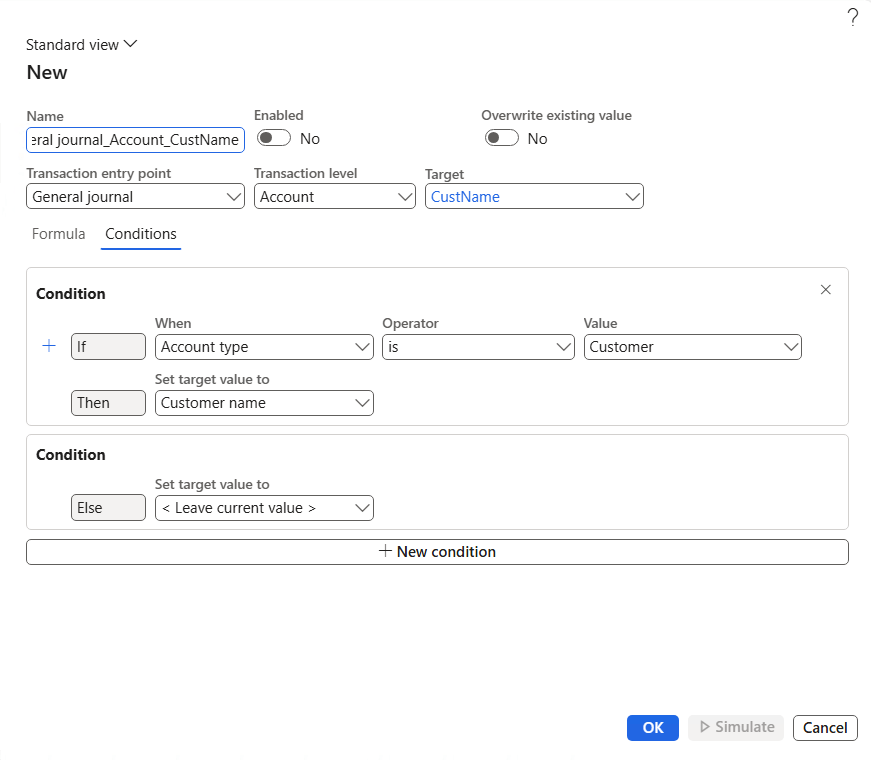
Next, you define the conditions that control when the rule applies. For example, you might create a rule that says: if the account type is Vendor, then default a specific financial tag with a value linked to the vendor group. Or if a certain main account is used, default a tag to a specific internal category. The system allows you to build this logic using a guided rule builder experience, so you do not need advanced technical skills.
The rules are evaluated whenever a transaction is created or edited. If the transaction meets the conditions you defined, the system automatically fills in the financial tag value. Users can still review or adjust the value if needed, but in most cases, the default will save time and reduce errors.
Another helpful feature is the ability to simulate a rule before activating it. You can test the logic against existing posted transactions to see how the rule would behave. This helps ensure the rule works as expected before applying it in live transactions.
Overall, default financial tag rules help improve data quality and consistency across the organization. They reduce manual effort, standardize tagging practices, and make reporting more reliable. For organizations that rely heavily on tagging for analysis or compliance, this feature can make a noticeable difference in day-to-day finance operations.
By thoughtfully defining tag rules, finance teams can automate part of their data entry process and focus more on analysis and decision-making rather than repetitive tasks.
Refer to below Microsoft learn link for more details https://learn.microsoft.com/en-us/dynamics365/finance/general-ledger/financial-tag-defaulting
 Brewing thought
Leave a comment