Microsoft continues to refine the user experience in Dynamics 365 Finance & Operations, and the 10.0.46 release brings a subtle yet highly impactful improvement — the ability to customize how many sales order lines appear in the Sales Order list page.
At first glance, this may seem like a minor UI enhancement. But for organizations dealing with high transaction volumes, this feature directly improves performance, usability, and operational efficiency.
Let’s break down why this matters and how it benefits both end users and system administrators.
The Challenge With Large Sales Order Lists
In many real-world implementations, especially in retail, manufacturing, distribution, and wholesale businesses, sales order volumes can grow rapidly. Over time, users face common issues such as:
- Slow loading of Sales Order list pages
- Difficulty navigating through long records
- Reduced productivity due to excessive scrolling
- Performance bottlenecks during peak business hours
- Cluttered screens with irrelevant historical data
These challenges not only affect user satisfaction but also impact daily operations such as order processing, fulfillment, and customer service.
What’s New in Version 10.0.46?
With this release, Microsoft has introduced the ability to limit the maximum number of sales orders displayed in the list view.
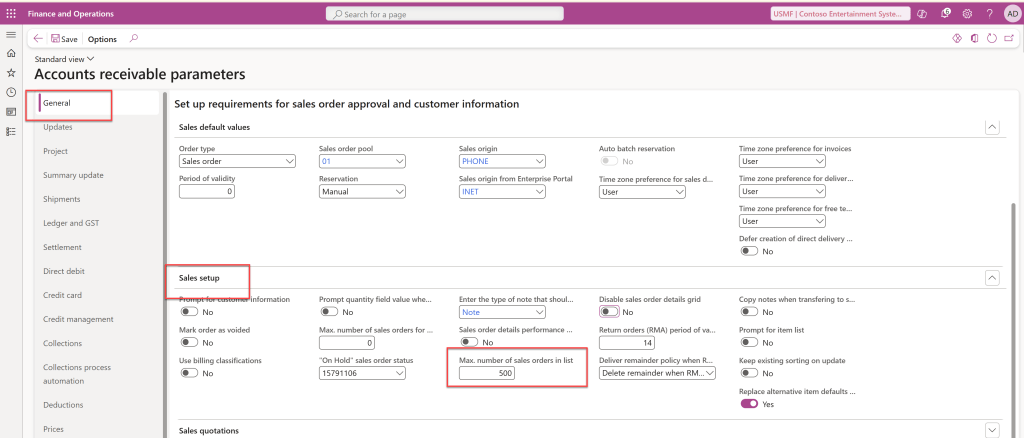
This means organizations can now control:
- How many records load initially
- How much data is rendered on screen
- The balance between visibility and performance
Instead of loading thousands of records by default, businesses can configure a sensible threshold that keeps the interface fast and focused.
Why This Feature Is Important
1. Improved Performance
Reducing the number of records displayed improves:
- Page load times
- Query execution speed
- System responsiveness
This is especially valuable in cloud environments where optimized performance directly impacts user experience.
2. Better User Experience
From an end-user perspective, this enhancement:
- Keeps the interface clean and readable
- Reduces scrolling fatigue
- Makes it easier to focus on active and relevant orders
- Improves navigation efficiency
Sales teams, customer service representatives, and operations users can now work faster without information overload.
3. Operational Efficiency
When teams spend less time waiting for pages to load or searching through massive datasets, productivity naturally increases.
Benefits include:
- Faster order processing
- Reduced manual filtering effort
- Improved response time for customers
- Smoother daily operations
4. Administrator Control and Standardization
For system administrators and solution architects, this feature offers better governance by allowing consistent configuration across environments and teams.
It supports:
- Standardized list page behavior
- Controlled data visibility
- Better performance tuning
- Easier environment optimization
Practical Use Cases
Here are some scenarios where this feature delivers immediate value:
High-Volume Retail Businesses
Retailers processing thousands of POS orders daily can restrict list views to recent transactions for faster navigation.
Manufacturing Organizations
Production planners and sales coordinators can focus on active sales orders without loading completed or historical data.
Distribution and Logistics Companies
Warehouse and fulfillment teams benefit from cleaner views that highlight actionable orders.
How This Fits Microsoft’s Broader Strategy
This enhancement aligns with Microsoft’s broader roadmap of:
- Improving ERP usability
- Enhancing performance optimization
- Reducing UI complexity
- Making cloud ERP more responsive
- Supporting scalable enterprise workloads
Rather than introducing only large headline features, Microsoft is also focusing on these micro-improvements that significantly impact daily operations.
 Brewing thought
Leave a comment