Microsoft Copilot Studio makes it possible for organizations to build AI assistants that can talk to users, answer questions, automate work, and connect directly to business systems. While creating a copilot might look simple on the surface, there is a powerful set of components working behind the scenes.
Understanding these components is important not only for developers, but also for business users, consultants, architects, and decision makers. When you understand how Copilot Studio is structured, you can design better assistants, avoid common configuration mistakes, and create solutions that scale as your organization grows.
This article breaks down the internal structure of Copilot Studio and explains how each part contributes to the overall experience.
What Copilot Studio Really Is
Copilot Studio is not just a chatbot tool. It is a full platform for building intelligent business assistants. It combines conversational AI, automation, data integration, security, and analytics into one unified environment.
At its core, Copilot Studio helps organizations solve three major problems:
Helping users get information quickly
Helping users complete tasks easily
Helping systems work together intelligently
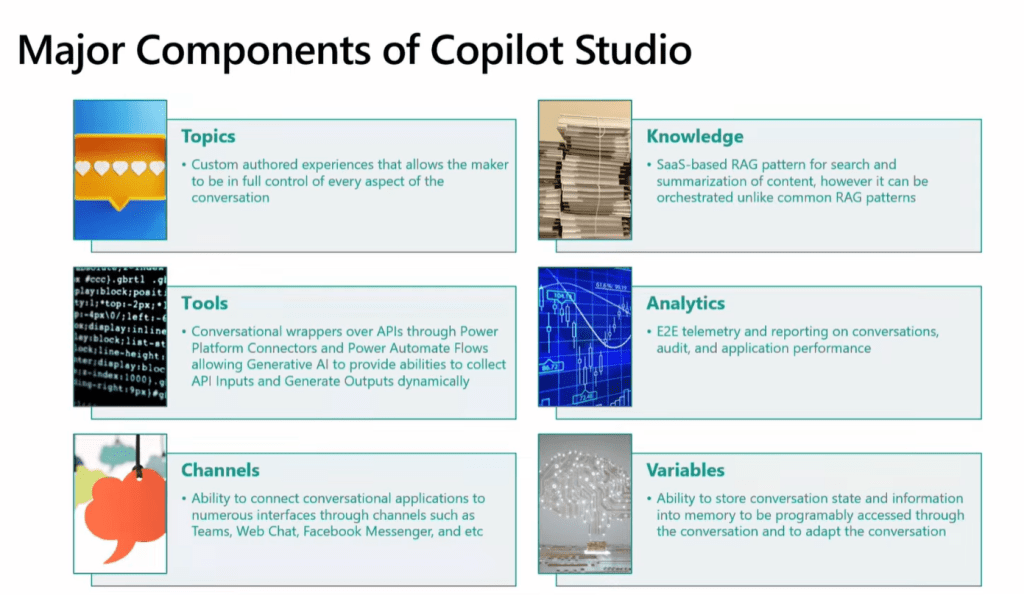
To achieve this, Copilot Studio is built from several interconnected components. Each component plays a specific role, and together they form the “anatomy” of a copilot.
The Orchestrator: The Decision Engine
The orchestrator is the central brain of Copilot Studio. Every interaction starts here.
When a user sends a message, the orchestrator analyzes the request and decides what should happen next. It does not simply match keywords. Instead, it uses AI to understand intent, context, and conversation history.
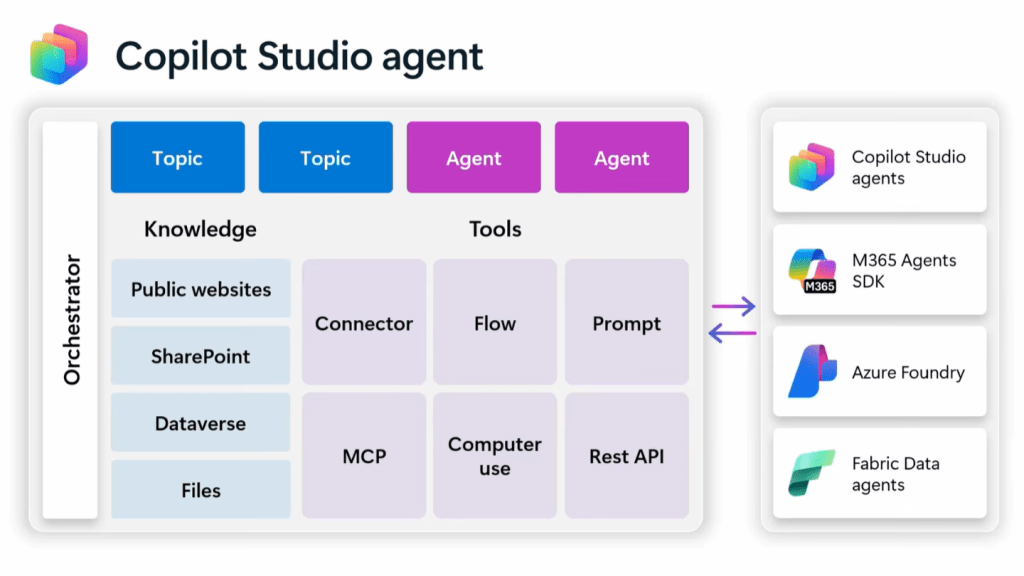
The orchestrator answers important questions such as:
What is the user trying to achieve?
Which conversation topic should be triggered?
Should enterprise knowledge be searched?
Is an external system action required?
Does the copilot need to ask for more information?
Modern Copilot Studio uses generative orchestration, which allows the AI to dynamically choose the best path instead of following fixed rules. This makes copilots more flexible, more natural to use, and better at handling complex requests.
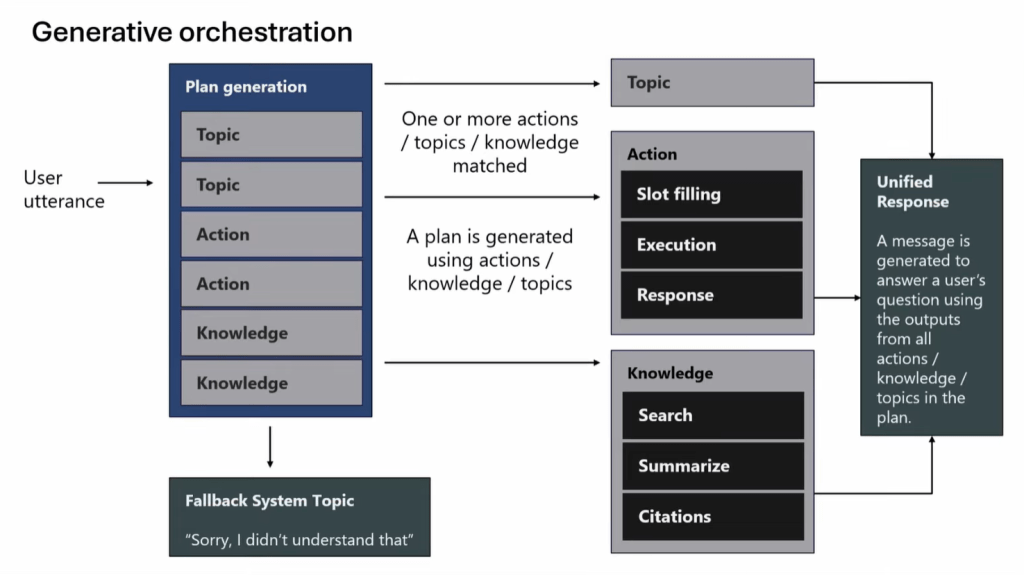
Without the orchestrator, Copilot Studio would behave like a simple script. With it, the platform behaves like an intelligent assistant.
Topics: The Business Conversation Logic
Topics define how your copilot handles specific business scenarios. They are the structured conversation flows that guide users through tasks and requests.
Each topic usually represents a business use case. For example:
Requesting leave
Checking order status
Creating a support ticket
Updating customer details
Booking a meeting
Topics contain conversation logic such as:
Trigger conditions
Questions asked to the user
Decision paths
System actions
Final responses
They help you control how conversations behave and ensure that important business rules are followed.
Even though generative AI is involved, topics provide structure and predictability. They allow organizations to define boundaries and ensure consistent experiences.
Knowledge Sources: The Information Layer
One of the most powerful features of Copilot Studio is its ability to use enterprise knowledge.
Knowledge sources allow copilots to answer questions using your organization’s content. Instead of hardcoding answers, you can connect Copilot Studio to live information sources.
These can include:
SharePoint sites
Internal portals
Public websites
Uploaded documents
Training manuals
Policy libraries

When a user asks a question, the copilot searches these sources and summarizes relevant content in natural language.
This turns Copilot Studio into a smart enterprise search assistant that understands context and delivers concise answers.
Knowledge sources are especially useful for HR policies, product documentation, internal procedures, and training material.
Tools and Actions: The Operational Layer
Tools and actions allow Copilot Studio to interact with real business systems. This is what enables copilots to do more than just talk.
Through tools and actions, Copilot Studio can:
Create records
Update data
Trigger workflows
Send emails
Call APIs
Integrate with ERP and CRM systems
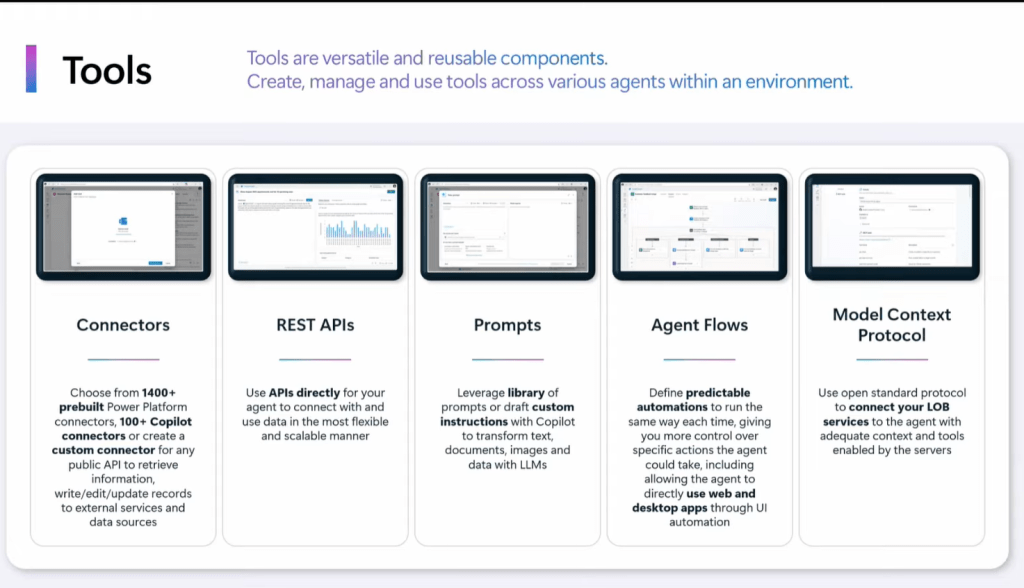
For example, a copilot can create a purchase order, update a customer record, or submit an approval request.
These integrations are what transform Copilot Studio from a conversational assistant into a true business automation platform.
Agent Flows: Automation Inside Conversations
Agent Flows are automation workflows built specifically for Copilot Studio.
They are designed to run inside conversations and respond in real time. Unlike background automation, Agent Flows are tightly connected to chat interactions.
When a user asks the copilot to perform an action, an Agent Flow can:
Receive conversation inputs
Execute business logic
Return structured results
Continue the conversation
This allows copilots to perform tasks while maintaining a natural conversation experience.
Agent Flows are especially useful for transactional actions such as data lookups, record creation, and updates.
Variables and Memory: Keeping Context Alive
A good conversation feels natural and continuous. Copilot Studio achieves this through variables and conversation memory.
Variables store important information collected during the conversation. This can include:
Names
IDs
Dates
Selections
User preferences
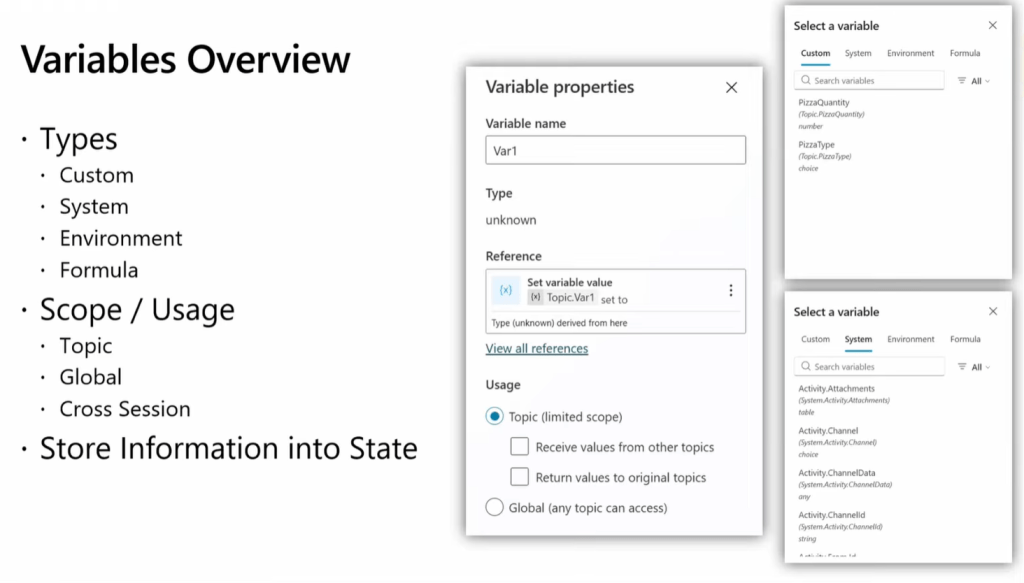
By storing this information, the copilot can reference it later in the conversation without asking the same questions again.
Memory also allows the copilot to maintain context across multiple messages, making interactions feel more human and less repetitive.
Security and Access Control: Protecting Enterprise Data
Security is built into Copilot Studio at the platform level.
Copilot Studio integrates with Microsoft Entra ID to manage authentication and authorization. This ensures that users only access information they are permitted to see.
Security controls allow organizations to:
Restrict data access
Apply role-based permissions
Protect sensitive information
Meet compliance requirements
This is critical for enterprise deployments where data privacy and governance are essential.
Channels and Deployment: Reaching Users Everywhere
Once a copilot is built, it must be delivered to users. Copilot Studio supports deployment across multiple channels.
Common channels include:
Microsoft Teams
Company websites
Customer portals
Internal applications

This allows organizations to create one copilot and make it available in many places without rebuilding the solution.
This multi-channel capability helps maximize adoption and reach more users.
Analytics and Monitoring: Improving Performance Over Time
Copilot Studio includes built-in analytics and reporting tools.
These tools help teams understand:
How often the copilot is used
Which topics are most popular
Where users get stuck
Which questions fail
How conversations perform
Analytics provide insights that allow continuous improvement. Teams can refine topics, update knowledge sources, and optimize automation based on real usage data.
How All Components Work Together
To understand the full anatomy, it helps to look at a typical interaction flow.
A user sends a message.
The orchestrator analyzes intent.
The correct topic is selected.
Knowledge sources are searched if needed.
Tools or Agent Flows are triggered.
Variables store information.
A response is generated.
Analytics capture the interaction.
This entire process happens in seconds and feels seamless to the user.
Why Understanding the Anatomy Matters
Understanding how Copilot Studio is structured helps organizations:
Design better copilots
Create scalable solutions
Improve performance
Reduce errors
Enhance user experience
Align business and technical teams
It also helps organizations plan ownership. Business teams can manage topics and knowledge. Technical teams can manage integrations and security. Together they can build better AI solutions.
Final Thoughts
Copilot Studio is much more than a chatbot builder. It is a complete platform for building intelligent business assistants.
Every component plays a critical role:
The orchestrator manages decisions.
Topics guide conversations.
Knowledge sources provide information.
Tools and flows perform actions.
Security protects data.
Analytics enable improvement.
When these components work together, Copilot Studio becomes a powerful engine for digital transformation.
Microsoft Reference Links for Further Reading
Copilot Studio Overview
https://learn.microsoft.com/en-us/microsoft-copilot-studio/fundamentals-what-is-copilot-studio
Create and Manage Topics
https://learn.microsoft.com/en-us/microsoft-copilot-studio/authoring-create-edit-topics
Advanced Generative Actions
https://learn.microsoft.com/en-us/microsoft-copilot-studio/advanced-generative-actions
Use Knowledge Sources
https://learn.microsoft.com/en-us/microsoft-copilot-studio/knowledge-sources
Integrate Power Platform
https://learn.microsoft.com/en-us/microsoft-copilot-studio/integrate-power-platform
 Brewing thought
Leave a comment