Understanding MCP Servers in Dynamics 365 Finance & Operations
Model Context Protocol (MCP) to make it easier for AI agents (like Copilot and custom agents) to work safely and intelligently with ERP systems such as Dynamics 365 Finance & Operations.
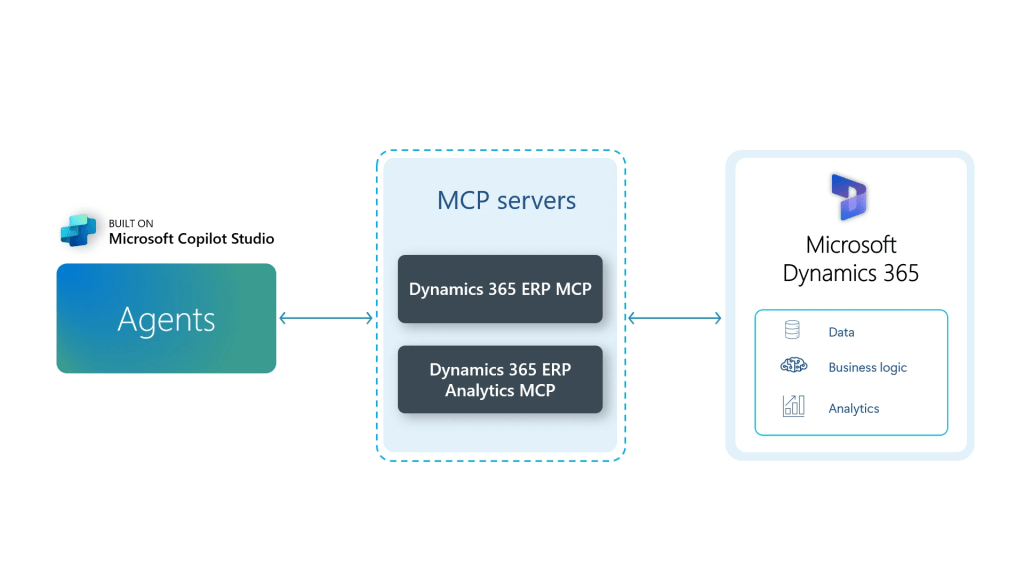
Instead of building many custom APIs or integrations, MCP provides a standard and secure way for AI to understand:
- What data exists
- What actions are allowed
- What business rules and security apply
For Dynamics 365 F&O, Microsoft has introduced two types of MCP servers, each with a clear purpose.
1. Dynamics 365 ERP MCP server (for doing work)
What it is
The Dynamics 365 ERP MCP server allows AI agents to perform actions in Dynamics 365 F&O, just like a real user would.
In simple terms
This server lets AI:
- Open forms
- Read and update records
- Trigger business processes
- Follow the same validations, workflows, and security rules as users
It does not rely on a small, fixed set of APIs. Instead, it works dynamically with the existing ERP application, including customizations and extensions.
Why it’s valuable
- AI can automate real business tasks, not just answer questions
- No need to build and maintain custom integrations
- Business logic and security stay consistent
- Works across Finance, Supply Chain, Projects, HR, and more
Example
An AI agent can create a purchase order, validate it, submit it for approval, and check its status — using the same rules your users follow.
2. Dynamics 365 ERP MCP server for analytics (for understanding data)
What it is
The Analytics MCP Server allows AI agents to read and reason over analytics data from Dynamics 365 F&O.
In simple terms
This server helps AI:
- Access trusted business metrics
- Understand financial and operational KPIs
- Answer analytical questions using governed data models
It focuses on insights, not transactions.
Why it’s valuable
- Everyone uses the same definitions for metrics like revenue, margin, or cash flow
- AI answers are based on trusted, business-approved data
- Business users can ask questions in plain language instead of running reports
Example
A user can ask, “Why did operating costs increase this month?” and the AI can analyze the underlying ERP data and explain the reason.
How the Two Servers Work Together
| MCP Server | Main Purpose | What It Enables |
|---|---|---|
| Dynamics 365 ERP MCP server | Execute business actions | Automation, process execution, system interaction |
| Dynamics 365 ERP MCP server for analytics | Analyze business data | Insights, explanations, decision support |
Together, they allow AI to both understand what’s happening in the business and take action when needed.
Why This Matters for Customers and Partners
With these two MCP servers:
- AI becomes a natural extension of Dynamics 365 F&O
- ERP systems move from being “systems of record” to “systems of action”
- Partners can build powerful agents faster, with less custom code
- Businesses get real value from AI without compromising governance or security
In short, MCP makes Dynamics 365 Finance & Operations ready for agent-based, AI-driven business processes. Refer to below link for more details https://www.microsoft.com/en-us/dynamics-365/blog/it-professional/2025/11/11/dynamics-365-erp-model-context-protocol/
 Brewing thought
Leave a comment