Recently after restoring Database from Tier 2 to Tier 1 environment, where Dual Write was enabled in Tier 1 environment and not in Tier 2 environment. I faced below error when trying to run the Reset link wizard on the select legal entity wizard page

Below is the complete error:
“[UnknownError] Type=Microsoft.Dynamics.Integrator.Exceptions.IntegratorClientException, Msg=Unable to retrieve legal entity for AX environment: https://XYZdevaos.axcloud.dynamics.com/data/LegalEntities?$select=LegalEntityId,Name(Type=Microsoft.PowerApps.CoreFramework.Communication.Http.NonSuccessHttpResponseException, StatusCode=Forbidden, Msg=Server returned non-success HTTP response)”
After troubleshooting I found the reason that we need to grant Dataverse access to connect to F&O by adding below application Id’s in the System administration >> Setup >> Azure active directory applications ( now renamed to Microsoft Entra ID applications).
- 6f7d0213-62b1-43a8-b7f4-ff2bb8b7b452
- 2e49aa60-1bd3-43b6-8ab6-03ada3d9f08b
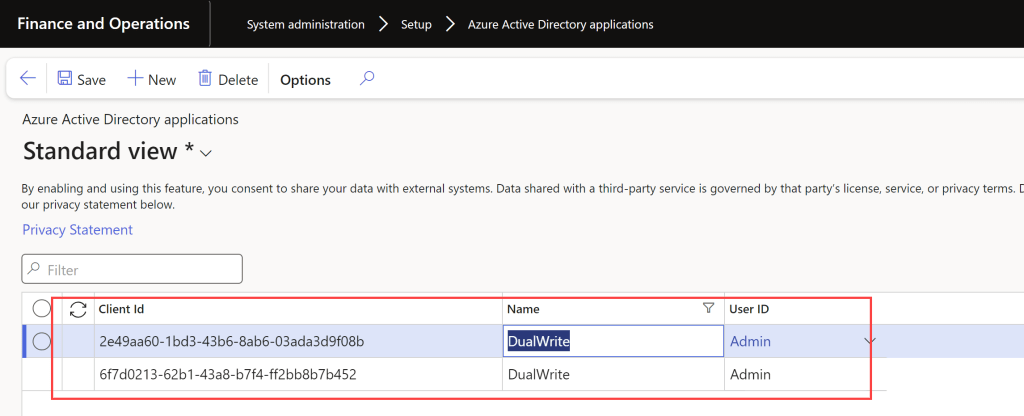
As the source environment was not having Dual Write enabled in it, hence this setup was required to be done again in the target environment even if Dual Write was originally configured in the Target environment.
After this setup, I was able to proceed further with the reset link process. Please note I experienced this behavior in F&O version 10.0.33 , as Dual Write framework keeps getting fixes it might get more smooth going forward.
Details can also be found at Docs https://learn.microsoft.com/en-us/dynamics365/fin-ops-core/dev-itpro/data-entities/dual-write/requirements-and-prerequisites
Thanks for reading the post.
 Brewing thought
Leave a comment