AX2012 : Tip when using date effective tables as a reference data source

Written in

by

Hi Friends,
Reference data sources is a powerful feature in AX 2012. A reference data source enables you to add the replacement fields for a surrogate foreign key replacement to a form design. It is used extensively on standard AX forms.

It becomes more interesting, when we reference date effective tables . In such scenarios we need to perform some steps to make sure that the date effective tables are queried correctly.

We can find a good example on sales table form. Let us have a look:

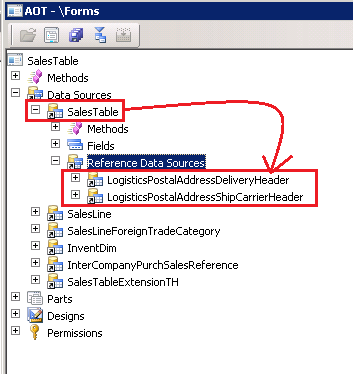
1. The date effective data sources are added under the sales table datasoure node as reference data sources.
 

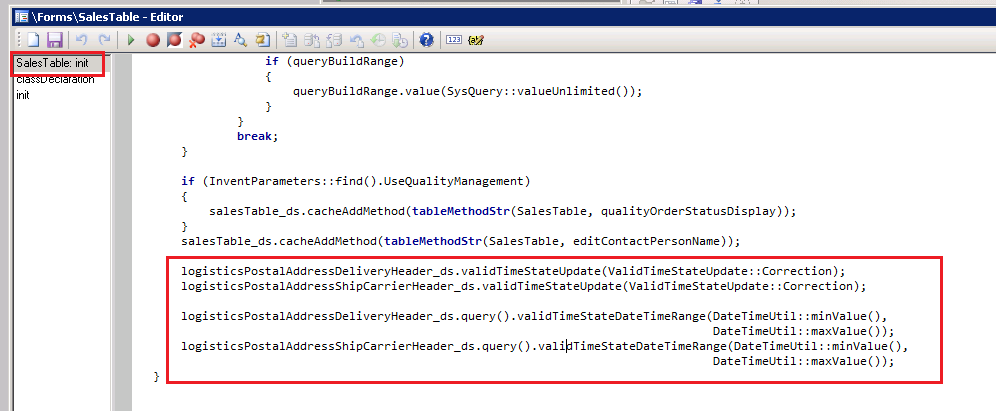
2. The below piece of code on form init() method to check the validity:


3. The below piece of code is added on sales table datasource  >> init() method, to set the valid time state range criterions:
 

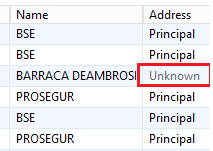
If you doing some development task and plan to add date effective tables as reference data source, then make sure to model it the same way. Not doing so will cause an issue that the expired records will display a \”Unknown\” value in the reference data source record. A similar problem has been reported on Microsoft dynamics AX community forum. Detail can be found at this link. The below image reference is taken from the link:
Whitepaper to use date effective framework can be downloaded from here, however this information is not mentioned there.

Thanks for reading the blog.
 

Tags

Categories

8 responses to “AX2012 : Tip when using date effective tables as a reference data source”

  1. Anonymous Avatar
    Anonymous

    Good and useful post 🙂 thanks for sharing.

    Like

  2. Nagesh Kumar Avatar

    Thank you..This is useful information

    Like

  3. Naresh Konda Avatar

    Thank you for Providing Useful Stuff.

    Like

  4. Anonymous Avatar
    Anonymous

    Awesome article. It is so detailed and well formatted that i enjoyed reading it as well as get some new information too.mulesoft training online

    Like

  5. Unknown Avatar

    Great Post! Good Explanation. I like the way you described this useful content. Microsoft Dynamics AX,Financial management functionality that ranges from general ledger, accounts payable, and accounts receivable modules to bank reporting, cash flow management, and reconciliation. Modules include Readmore..

    Like

  6. Anonymous Avatar
    Anonymous

    Good Post! Thank you so much for sharing this pretty post, it was so good to read and useful to improve my knowledge as updated one, keep blogging.salesforce course in chennaisoftware testing course in chennairobotic process automation rpa course in chennaiblockchain course in chennaidevops course in chennai

    Like

Leave a comment

Wait, does the nav block sit on the footer for this theme? That's bold.

Brewing thought

Explore world of Microsoft Dynamics 365

Explore the style variations available. Go to Styles > Browse styles.